For every UNISA student, accessing your MyLife email login is one of the most important parts of your academic journey. Whether you’re waiting for assignment updates, exam notifications, or important communication from the university, your MyLife email is where everything happens.
However, many students struggle with the MyLife email login, especially when passwords stop working or the system behaves unexpectedly. If you’ve ever found yourself stuck trying to log in, you’re not alone.
In this article, you’ll learn exactly how to access your MyLife email, why it matters, and how to quickly fix the most common login problems without stress.
Understanding MyLife Email Login for UNISA Students
The MyLife email login is UNISA’s official student email system. Once you register at the university, you are automatically given a MyLife email account, which becomes your main communication channel.
This email is not just another inbox. It is where UNISA sends critical academic information, including updates about modules, assignment deadlines, and important announcements. Missing access to your MyLife email login could mean missing essential information that affects your studies.
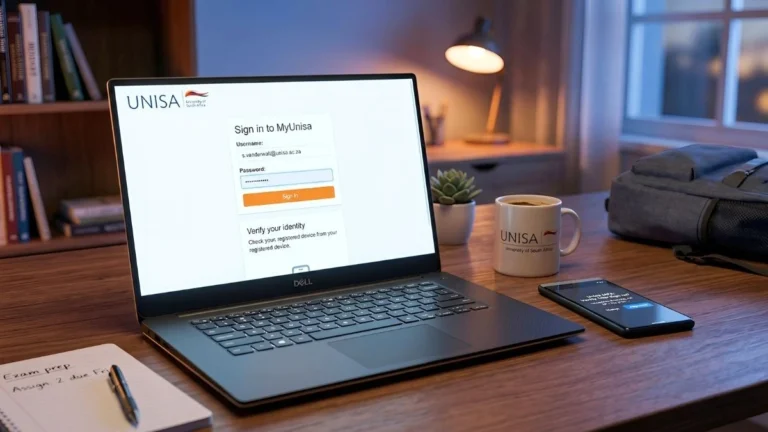
Once you are on the page, enter your full student email address along with your password. After that, simply click the sign-in button to access your inbox.
If everything is correct, you will be redirected to your email dashboard where you can read messages, send emails, and manage your account.
Many students make small mistakes here, such as entering the wrong email format or using an outdated password, which leads to login failure.
Why Students Struggle with MyLife Email Login
Even though the system is simple, issues with MyLife email login are very common. These problems usually happen because of small technical errors or forgotten login details.
One of the biggest reasons students cannot log in is incorrect credentials. Entering the wrong password multiple times can also temporarily lock your account, making the situation more frustrating.
Another common issue is browser-related. Sometimes your browser cache or saved data interferes with the login process. This can cause the page to fail or load incorrectly.
There are also times when UNISA systems experience downtime. During these periods, even correct login details will not work.
If your MyLife email login is not working, the good news is that most issues can be fixed within minutes.
The first thing you should do is double-check your email format. Always make sure you are using your full MyLife email address correctly.
If your password is the problem, you can reset it using the UNISA password management system. Visit: https://md.unisa.ac.za
From there, follow the password reset steps. You will need your student number and possibly additional verification details.
If the issue is not related to your password, try clearing your browser cache or switching to a different browser like Chrome or Microsoft Edge. You can also try logging in using incognito mode, which often bypasses stored data issues.
If none of these solutions work, it may simply be a system issue. In that case, waiting a few hours and trying again usually resolves the problem.
For many students, resetting their password is the fastest way to regain access to their MyLife email login.
To do this, go to the UNISA password reset page and select the option to change or reset your password. Enter your student number and follow the instructions provided.
When creating a new password, make sure it is strong and secure. Avoid using simple combinations and try to include a mix of letters and numbers.
Once your password is reset, return to the MyLife email login page and sign in again using your new credentials.
Accessing MyLife Email Login on Mobile Devices
In 2026, many students prefer accessing their email on mobile devices. Fortunately, the MyLife email login works well on smartphones.
You can simply open your mobile browser and visit the MyLife login page. Enter your details and access your inbox just like you would on a computer.
Alternatively, you can use apps like Microsoft Outlook. Adding your MyLife email to the app allows you to receive notifications instantly and stay updated wherever you are.
This is especially useful for students who need quick access to academic updates throughout the day.
The Importance of MyLife Email Login for Your Studies
Your MyLife email login is more than just a login page. It is your direct connection to UNISA.
Through this email, you receive:
Assignment instructions
Exam updates
Registration information
Communication from lecturers
Ignoring your MyLife email or failing to access it regularly can put you at a disadvantage. Staying logged in and checking your email frequently ensures you never miss important updates.
Helpful Student Resources You Should Know
While using your MyLife email login, it’s also important to stay connected to other key student platforms.
These platforms work together with your MyLife email to support your academic journey.
Final Thoughts on MyLife Email Login UNISA
The MyLife email login is one of the most essential tools for any UNISA student in 2026. Whether you are submitting assignments, checking updates, or communicating with your lecturers, your email is at the center of everything.
If you ever experience login issues, remember that most problems have simple solutions. From resetting your password to checking your browser, a few quick steps can get you back on track.
Make it a habit to check your MyLife email regularly and keep your login details secure. Doing so will ensure that you stay informed, organized, and fully prepared throughout your academic journey.
❓ Frequently Asked Questions About MyLife Email Login
What is MyLife email login at UNISA?
The MyLife email login is the official email system for UNISA students. It allows students to receive important academic updates, communicate with lecturers, and stay informed about assignments and exams.
How do I log into my MyLife email?
To access your MyLife email login, go to the official UNISA email page and enter your student email address along with your password. Once logged in, you will be able to access your inbox and manage your emails.
There are several reasons your MyLife email login may not be working: Incorrect email or password Forgotten login details Browser issues or cached data Temporary UNISA system downtime Try resetting your password or clearing your browser cache to fix the issue.
How do I reset my MyLife email login password?
To reset your MyLife email login password, visit the UNISA password management page and follow the reset instructions. You will need your student number to complete the process.
Can I access MyLife email on my phone?
Yes, you can access your MyLife email login on your phone using a web browser or by setting it up in apps like Microsoft Outlook. This allows you to receive updates and notifications instantly.
Is MyLife email the same as MyUNISA?
No, they are different systems: MyLife email login is your student email MyUNISA is the student portal used for coursework, assignments, and academic records Both are important and should be used together.
How often should I check my MyLife email?
You should check your MyLife email login daily. Important updates about assignments, exams, and university communication are sent there, and missing them could affect your studies.
Nonhlanhla Ndlovu is the founder and publisher of EduFeeds, a South Africa–focused platform that shares verified learnerships, internships, bursaries, and job opportunities for young people and job seekers.
With a strong focus on helping South African youth access real career opportunities, Nonhlanhla researches and verifies programmes from official company sources and public announcements before publication. EduFeeds aims to simplify the application process by providing clear guidance, requirements, and practical tips to help applicants apply with confidence.
Nonhlanhla continues to monitor updates from SETAs, companies, and training providers to ensure information on Edu Feeds remains current and useful. She focuses on publishing timely and accurate opportunity updates for the South African youth employment market.
Getting invited to a learnership interview is a major step toward starting your career. Many applicants submit applications for learnership programmes every year, but only a small number reach the interview stage. How to Pass Learnership Interviews in South Africa-Overview If you have received an interview invitation, it means the organisation already sees potential in…
Searching for a learnership or entry-level job can be an exciting step toward building your career. Thousands of young South Africans apply for learnerships every year to gain valuable workplace experience and industry training. How to Spot Fake Learnerships and Job Scams-overview Unfortunately, scammers often take advantage of job seekers by advertising fake learnership opportunities…
Breaking into a learnership in 2026 is more competitive than ever—especially in South Africa, where thousands of young people apply for a limited number of opportunities. If you’ve been applying and hearing nothing back, you’re not alone. But the difference between being ignored and being shortlisted often comes down to strategy—not luck. This in-depth guide…
The MyUnisa Login portal is one of the most important tools for students studying at the University of South Africa. Every semester, thousands of students rely on the MyUnisa student portal and MyLife login email to access study materials, submit assignments, communicate with lecturers, and receive important university announcements. However, many new students experience difficulties…
If you are trying to enter the job market in 2026, understanding how SETA learnerships work in South Africa could give you a major advantage. Thousands of young South Africans secure their first workplace experience each year through SETA-funded learnerships. These structured programmes combine formal training with real work exposure, helping participants build both qualifications…
SA Youth is one of the most powerful platforms helping unemployed young people in South Africa connect with real employment opportunities. Every year, thousands of youth search for SA Youth opportunities to apply for government programmes, internships, learnerships, and entry-level jobs across the country. The platform, accessible through SAYouth.mobi, is designed to link young work-seekers…